
Best Ecommerce Hosting in South Africa
Ecommerce Hosting
There’s a lot to tackle when building an e-commerce store, from choosing a domain to creating your website. To make your e-commerce site run smoothly, you need the best web hosting company with fast and reliable performance. However, most people overlook choosing the right ecommerce hosting.
- Hosting plays an important role in page speed, checkout experience, customer trust, search engine rankings, and ultimately sales. A slow or unreliable hosting provider can lead to abandoned carts, poor Google rankings, and lost revenue.
That’s why choosing the best hosting for your business is essential. In this in-depth guide, we’ll break down what ecommerce hosting is, how it differs from regular hosting, and how to choose the best ecommerce hosting in South Africa.
What Is Ecommerce Hosting

Ecommerce hosting is a specialized type of web hosting designed specifically for online stores. In simple terms, ecommerce hosting is the service that provides everything an online store needs to run and stay available on the internet. It keeps your website online 24/7, allowing visitors and customers to browse products and make purchases at any time.
Unlike standard web hosting, ecommerce hosting offers the performance, security, and reliability required to run an ecommerce website smoothly. Platforms like WooCommerce need more server resources because they manage products, orders, payments, and customer accounts in real time.
Ecommerce hosting ensures your online store remains fast, secure, and accessible—even during high-traffic or peak shopping periods.
Key Features of Ecommerce Hosting (SSL, Speed, Security, Uptime)
A reliable ecommerce hosting solution includes features that are essential for online selling:
SSL Certificates: It encrypts sensitive customer data and enables secure checkout. It builds trust and is a must-have for Google rankings and online payments.
High Speed Performance: Fast servers, SSD storage, and optimized configurations ensure quick page load times and smooth checkout experiences.
Advanced Security: Ecommerce hosting includes firewalls, malware protection, and secure server environments to protect your store from cyber threats.
High Uptime Reliability: 99.9% uptime ensures your ecommerce website stays online, preventing lost sales and frustrated customers.
Together, these features form the backbone of a successful ecommerce website.
Difference Between Ecommerce Hosting vs Normal Hosting
Data table of Ecommerce Hosting vs Normal Hosting:
| Feature | Ecommerce Hosting | Normal Web Hosting |
|---|---|---|
|
Purpose |
Designed specifically for online stores |
Designed for blogs and informational websites |
|
Performance |
Optimized for fast page loads and smooth checkout |
Basic speed with no ecommerce optimization |
|
Security |
Advanced security for payments and customer data |
Limited security features |
|
SSL Certificate |
Included and essential for secure transactions |
May be optional or paid |
|
Traffic Handling |
Handles high traffic and sales spikes |
Can struggle with multiple users |
|
Checkout Support |
Optimized for cart and payment processing |
Not optimized for transactions |
|
Scalability |
Easily scalable as the store grows |
Limited scalability |
|
Uptime Reliability |
High uptime to prevent lost sales |
Uptime not optimized for revenue sites |
|
Ecommerce Platform Support |
WooCommerce and ecommerce-ready |
Not ideal for WooCommerce |
|
Best For |
Online stores and ecommerce businesses |
Blogs and basic websites |
Why Ecommerce Sites Require Specialized Hosting
Ecommerce websites handle sensitive customer information, real-time payments, and inventory changes. Specialized hosting ensures:
Secure transactions.
High performance .
Faster checkout.
Stable performance during traffic spikes.
Better SEO rankings.
Guaranteed Uptime and Reliability.
Ecommerce Hosting in South Africa

For ecommerce businesses in South Africa, choosing a local hosting provider offers clear benefits. Local hosting improves website speed, strengthens security, and provides support suited to the local market.
KM Hosting delivers fast and reliable ecommerce hosting using South African servers, reducing latency and improving checkout performance. Features such as free SSL certificates, WooCommerce-optimized hosting, and responsive local support help online stores run smoothly.
This makes KM Hosting a strong choice for businesses looking to grow their ecommerce presence in South Africa.
Local Server Speed & Low Latency Benefits
Faster page loads for SA customers (under 2s)
Reduces cart abandonment by 30%+
Boosts conversions with seamless experience
Why South African Businesses Need Fast Local Hosting
Better local SEO rankings
POPI Act data compliance
24/7 local support response (20 mins avg)
Pricing Comparison in South Africa
| Hosting Provider | Starting Price (Monthly) | Key Features | Ideal For |
|---|---|---|---|
|
KM Hosting |
R50 – R200 |
Free SSL, unlimited bandwidth, local servers, fast support |
Ecommerce startups, small to medium businesses |
|
Xneelo |
From R99 |
Basic hosting features |
Entry-level websites |
|
Domains-co-za |
From R109 |
Standard hosting, limited resources |
Small businesses with simple needs |
KM Hosting provides affordable ecommerce hosting with powerful features, fast performance, and strong security for South African businesses
Fastest WordPress Ecommerce Hosting

Speed is essential for WordPress ecommerce websites. Fast hosting ensures quick page loads (<3s), smooth product browsing, and seamless checkouts—reducing cart abandonment by 30%+ and boosting sales.
WooCommerce relies on dynamic processes (cart updates, payments) that demand optimized servers and NVMe SSD storage. Slow hosting kills conversions.
Fast WordPress ecommerce hosting uses LiteSpeed, Redis caching, and local SA servers for sub-200ms TTFB. Hosting providers like KM Hosting delivers this speed with 10Gbit ports and zero-latency for South African shoppers.
Performance Benchmarks (TTFB, Page Load Speed)
TTFB (Time to First Byte) measures how quickly a server responds to a request. For fast WordPress ecommerce websites, a TTFB under 200ms is ideal. Page load speed should be under 3 seconds to keep visitors engaged and reduce bounce rates.
High-performance ecommerce hosting uses technologies like LiteSpeed servers, NVMe SSD storage, and advanced caching to achieve these speeds. Local South African hosting further reduces latency for WooCommerce stores.
Low TTFB and fast page load times improve user experience, SEO rankings, and ecommerce conversions—making these benchmarks critical for online store success.
Why Speed Impacts Ecommerce Sales & SEO
Speed can Impacts Ecommerce Sales & SEO for many reasons some of the reasons are below:
Sales Impact
A 1-second delay can reduce conversions by up to 7%.
53% of mobile users abandon a site if it takes longer than 3 seconds to load.
A 0.1-second improvement in mobile speed can increase conversions by 8.4%.
Shoppers are 45% less likely to purchase from slow websites.
Walmart reported a 2% increase in conversions for every 1 second improvement in page speed.
SEO Impact
Google Core Web Vitals prioritize fast-loading websites in search rankings.
Slow websites experience higher bounce rates, which negatively impact SEO.
Faster pages tend to rank higher in Google results (Backlinko study).
A 1-second speed improvement can result in up to 27% more mobile conversions.
Faster hosting improves both search visibility and ecommerce revenue.
How to Optimize WooCommerce Speed (10 Step Flow)
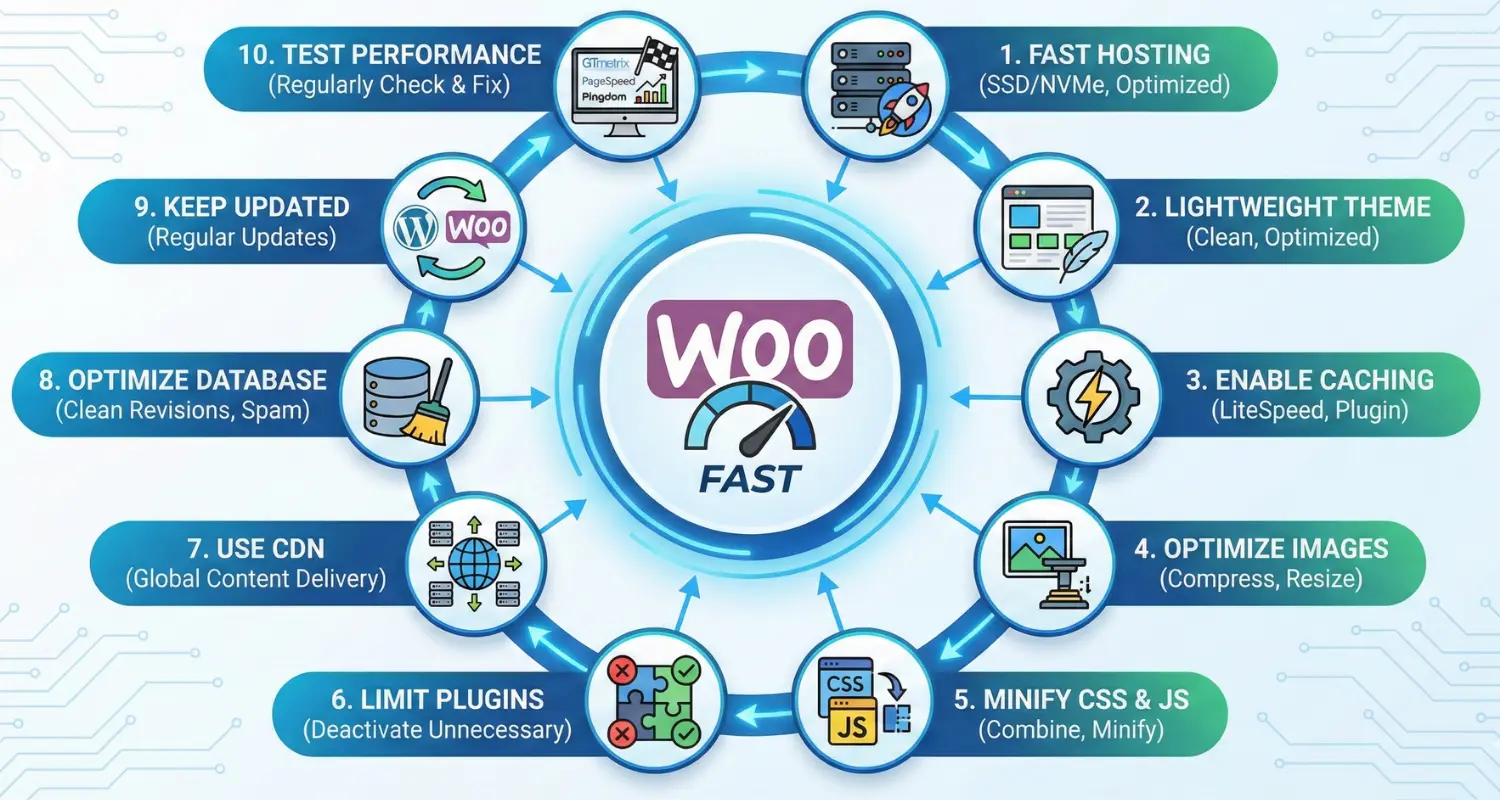
Below I have given step by step solution to increase WooCommerce speed:
Step 1: Choose fast WooCommerce hosting
= Pick a hosting provider optimized for WordPress + WooCommerce with SSD/NVMe storage.
Step 2: Use a lightweight theme
= Avoid heavy, bloated themes. Use a clean, optimized ecommerce theme.
Step 3: Enable caching
= Install and configure a caching plugin ( LiteSpeed Cache if your host supports it). Most South African hosting support LiteSpeed Cache.
Step 4: Optimize images
= Compress product images and use correct image sizes.
Step 5: Minify CSS & JavaScript
= Use your caching/optimization plugin to minify and combine CSS and JS files.
Step 6: Limit unnecessary plugins
= Deactivate and delete plugins you don’t really need.
Step 7: Use a CDN (Content Delivery Network)
= Connect a CDN to serve static files (images, CSS, JS) faster worldwide.
Step 8: Optimize your database
= Clean revisions, spam comments, and overhead using a database optimization tool.
Step 9: Keep everything updated
= Regularly update WordPress, WooCommerce, plugins, and themes.
Step 10: Test performance regularly
= Use tools like GTmetrix, PageSpeed Insights, or Pingdom to check speed and fix issues.
What Type of Hosting Do You Need for Ecommerce?

The right ecommerce hosting depends on how big your store is and how much traffic it receives. Small startup stores usually work well on shared hosting, while growing stores need VPS hosting. Large ecommerce websites with high traffic often require cloud or dedicated hosting.
Because ecommerce sites handle payments and customer data, reliable performance is essential. Weak hosting can cause slow loading pages and website downtime, especially during busy sales periods.
Shared vs VPS vs Cloud Hosting for Ecommerce
Ecommerce websites need hosting that offers the right balance of performance, security, and scalability. The best option depends on your store size and traffic. You can see the content below and choose the write hosting for your site.
Shared Hosting: Shared hosting is the most affordable option and is suitable for small ecommerce startups with low traffic. It supports basic WooCommerce setups and includes essential features like free SSL. However, since resources are shared with other websites, performance can slow down during busy periods, making it unsuitable for growing stores.
VPS Hosting: VPS hosting provides dedicated resources within a virtual environment, offering better speed, security, and reliability. It’s ideal for mid-sized ecommerce stores with steady growth and higher traffic. VPS hosting handles WooCommerce and payment processing more efficiently and allows easy upgrades as your business expands.
Cloud Hosting: Cloud hosting is designed for large or high-traffic ecommerce websites. It automatically scales resources during traffic spikes, ensuring high uptime and consistent performance. While more expensive, it’s the best choice for businesses that need flexibility, stability, and enterprise-level reliability.
| Aspect | Shared Hosting | VPS Hosting | Cloud Hosting |
|---|---|---|---|
|
Best For |
Small stores, low traffic. |
Growing mid-sized shops. |
High-traffic enterprises. |
|
Performance |
Average, shared resources. |
High, dedicated slices. |
Excellent, auto-scales. |
|
Security |
Basic. |
Good, customizable. |
Advanced, distributed. |
|
Scalability |
Limited. |
Moderate. |
Unlimited. |
Hosting Requirements for Small vs Large Stores
Small Stores:
Traffic: Under 10,000 visitors/month
Storage: 5-20GB SSD
CPU/RAM: 1-2 cores, 1-4GB RAM
Bandwidth: Unlimited basic
Security: Free SSL, basic protection
Cost: R50-R200/month
Ideal for startups and small WooCommerce sites
Large Stores:
Traffic: Over 100,000 visitors/month
Storage: 100GB+ NVMe
CPU/RAM: 4+ cores, 8GB+ RAM
Bandwidth: 10TB+ scalable
Security: Advanced firewalls, DDoS protection
Cost: R1000+/month
Best for high-traffic, large product catalogs needing reliability
Traffic, Storage & Bandwidth Needs Explained
Traffic Needs
Small Stores: <10,000 visitors/month; shared hosting handles peaks without slowdowns.
Medium Stores: 10,000-50,000 visitors/month; needs VPS for concurrent users during sales.
Large Stores: >100,000 visitors/month; cloud scales for spikes like Black Friday.
Storage Needs
Small Stores: 1-20GB SSD for 100-500 products.
Medium Stores: 20-100GB NVMe.
Large Stores: 100GB+.
Bandwidth Needs
Small Stores: 10-50GB/month.
Medium Stores: 50-500GB/month.
Large Stores: 1TB+ for high traffic.
How to Choose the Best Ecommerce Hosting Service

Choosing the right ecommerce hosting service has an important effect on your store’s speed, security, and overall performance. A professional hosting company guarantees that your pages load quickly, transactions are secure, and your organization can scale as it grows. Before picking a hosting package you can check this out to choose the best ecommerce hosting for your site.
Key factors to look for when choosing ecommerce hosting:
Fast server performance (SSD/NVMe storage, optimized hosting).
Free SSL certificate for secure transactions.
Strong security features such as firewalls and malware protection.
99.9% uptime guarantee to prevent lost sales.
Automatic backups for data protection.
Scalable resources to handle traffic growth.
Reliable customer support, preferably 24/7.
Essential Factors (Security, Backup, Speed, Support)
When choosing ecommerce hosting, certain factors are non-negotiable. These core features ensure your online store runs securely, loads quickly, and remains available to customers at all times. Ignoring any of these can lead to slow performance, security risks, or lost sales.
Essential factors to look for in ecommerce hosting:
Security: Free SSL certificates, firewalls, malware protection, and regular security updates to protect customer data and payments.
Backups: Automatic and frequent backups with easy restore options in case of data loss or errors.
Speed: High-performance servers, SSD/NVMe storage, and caching support to ensure fast page loads and smooth checkout.
Support: Reliable technical support that can quickly resolve hosting or WooCommerce issues when they arise.
KM Hosting excels in all four areas, providing enterprise-grade security and performance at startup prices for South African ecommerce.
What to Avoid When Choosing Hosting
Extremely cheap hosting plans.
No free SSL certificate.
Slow or overcrowded servers.
Lack of regular backups.
Hidden renewal costs.
Poor or slow customer support.
No scalability for traffic spikes.
No local SA servers.
Choose KM Hosting to sidestep these pitfalls with transparent pricing, 99.9% uptime, and local SA speed.
Checklist Before Buying (Free SSL, CDN, Email, Support)
Free SSL Certificates: Encrypts payments, builds trust (must-have for ecommerce)
CDN Integration: Speeds up global delivery, reduces latency worldwide
Professional Email Hosting: Custom domain emails (info@yourstore.co.za)
24/7 Responsive Support: Live chat <20min response, SA-based team
Unlimited Bandwidth: Handles traffic spikes without extra fees
Daily Backups: Automatic with easy 1-click restore
30-Day Money-Back: Risk-free testing period
KM Hosting includes all these essentials at startup prices for South African ecommerce success.
WooCommerce Hosting (Complete Guide)

WooCommerce is a very popular ecommerce platform for WordPress, but it needs good hosting to work well. WooCommerce needs more resources than a basic website because it manages products, orders, payments, and customer information in real time.
Choosing the right WooCommerce hosting will make your pages load faster, keep your transactions safe, and keep your site running smoothly even when there are a lot of visitors. Bad hosting can cause product pages to load slowly, checkout errors, and lost sales.
WooCommerce hosting is made to meet these needs by providing optimized server environments, strong security features, and resources that can grow as your business does.
Best Server Configuration for WooCommerce
Optimal WooCommerce servers use modern hardware and software for handling dynamic carts, payments, and product queries efficiently.
Recommended Specs
CPU: 4+ cores AMD/Intel Xeon (for concurrent users)
RAM: 8GB+ DDR5 (caching + database)
Storage: NVMe SSD (500% faster than SATA)
PHP: 8.2+ with OPcache
Web Server: LiteSpeed (10x faster than Apache)
Database: MariaDB 10.6+ with Redis caching
Network: 10Gbit ports, local SA servers
SA-Optimized Setup (KM Hosting)
Linux + LiteSpeed + NVMe SSD + PHP 8.2 + Redis + MariaDB 10Gbit uplink | 99.9% uptime | Free SSL |
This config delivers <200ms TTFB and <3s page loads for WooCommerce stores.
Why WooCommerce Needs More Resources
WooCommerce needs more resources than a regular WordPress website because it manages many dynamic processes at the same time like:
Dynamic product pages that update in real time.
Cart and checkout processing for each user.
Payment gateway integrations requiring secure connections.
Customer accounts and order management.
Product databases and inventory tracking.
Multiple plugins for shipping, tax, and payments.
Because of these requirements, WooCommerce performs best on hosting with higher CPU, RAM, and optimized server configurations.
How to Host a WooCommerce Website Properly
Hosting a WooCommerce website properly is essential for speed, security, and reliable performance. Below is the right hosting setup:
Steps to host a WooCommerce website properly:
Choose WooCommerce-optimized hosting with SSD or NVMe storage.
Install WordPress and WooCommerce in a clean and updated environment.
Enable caching and performance optimization at the server level.
Secure your website with free SSL and security protection.
Use reliable backups to protect orders and customer data.
Monitor performance regularly to identify and fix speed issues.
Upgrade resources as traffic grows to avoid slowdowns.
Following these steps helps ensure your WooCommerce store remains fast, secure, and ready to scale as your business grows.
Best Place to Host an Ecommerce Site

The best place to host an ecommerce site is close to your customers. For South African businesses, local hosting offers faster page loads, lower latency, and smoother checkout experiences. This improves local SEO and provides easy access to local support and pricing in Rand.
Below I have given a table in the table you can see who wins for hosting the site in South Africa.
Local vs International Hosting
| Aspect | Local SA Hosting | International Hosting |
|---|---|---|
|
Speed |
<200ms TTFB for SA users |
300-800ms latency |
|
Compliance |
POPI Act ready |
Data transfer issues |
|
Support |
Local team, 20min response |
Time zone delays |
|
Cost |
R50-R200/mo |
Often higher fees |
SA vs Global Providers
| Provider | Pros | Cons | Best For |
|---|---|---|---|
|
KM Hosting |
Local NVMe servers, free SSL, LiteSpeed, R50-R200 |
Smaller scale |
SA ecommerce startups |
|
Hostinger |
Cheap global CDN, scalable |
High SA latency |
International reach |
|
SiteGround |
Excellent speed globally |
Expensive for SA |
Enterprise global |
|
HostAfrica |
Fast WordPress, local |
Higher pricing |
Mid-sized SA stores |
KM Hosting wins for South African ecommerce with unbeatable local speed, security, and value .
Why KM Hosting Is the Best Option for SA Users
Local South African servers for faster loading speeds.
Low latency for smooth browsing and checkout.
WooCommerce-optimized hosting for ecommerce stores.
Free SSL certificates for secure payments.
Affordable pricing in ZAR with no hidden costs.
Reliable uptime for uninterrupted sales.
Fast local customer support.
Best Web Hosting for Small Business Ecommerce

For small businesses, choosing the right ecommerce hosting is a smart investment. The best web hosting for small business ecommerce combines affordable pricing, reliable performance, and essential security features to support online sales.
This is where KM Hosting stands out for South African small businesses. KM Hosting offers ecommerce-ready hosting with fast local servers, free SSL certificates, WooCommerce support, and pricing tailored for small business budgets. Its scalable plans allow startups to grow without paying for unnecessary resources.
Budget-Friendly Hosting for Startups
R50-R200/month plans with unlimited bandwidth
Free .co.za domain + SSL certificates included
Instant setup, no technical expertise needed
Features Small Businesses Actually Need
NVMe SSD + LiteSpeed for fast WooCommerce loads
Daily backups, malware protection
24/7 SA support (20min response)
Free migrations from other hosts
Avoid Overpriced Hosting Packages
Skip R300+ plans with unused enterprise features
KM Hosting delivers essentials at startup prices
99.9% uptime proven over 11 years
KM Hosting is Perfect for SA small businesses.
Cheap Ecommerce Hosting Without Compromising Quality

Budget ecommerce hosting doesn’t mean cutting corners on speed or security—KM Hosting proves this with R50-R200/month plans packed with enterprise features.
How to Find Affordable but Reliable Hosting
Look for unlimited bandwidth + free SSL (no hidden overage fees)
Prioritize NVMe SSD + LiteSpeed over cheap HDD plans
Check 99.9% uptime guarantees with real reviews
Hidden Costs of Cheap Hosting Providers
Renewal price jumps (R50 → R300)
Bandwidth caps during sales
Extra fees for SSL, backups, migrations
KM Hosting Affordable Plans Explained
| Plan | Price | Storage | Features |
|---|---|---|---|
|
Entry |
R50/mo |
10GB NVMe |
Free SSL, unlimited BW, LiteSpeed |
|
Business |
R150/mo |
Unlimited |
+ Free .co.za domain, daily backups |